¶ 1. Parameters
¶ 1.1 Recommended Settings
When you select an official material from the Material Library, the software automatically loads a set of recommended engraving parameters that have been fully tested for optimal performance.
¶ 1.2 Custom Settings
When you choose Unknown Material or manually modify any parameter, the system switches the parameter group to Custom. If you want to save your current setup, click the icon on the right  A naming dialog will appear, allowing you to save the current configuration.
¶ 1.3 Saved Presets
- You can quickly reuse any custom presets you saved earlier.
- To delete a preset, click the dropdown arrow, hover over the preset you want to remove, and click the delete
 button on the right .
Selected presets cannot be deleted.
¶ 2. Cutting Power
Controls the laser’s output energy during cutting, which determines the cutting depth and penetration ability.
- Setting power: Adjust using the slider or by entering numbers manually.
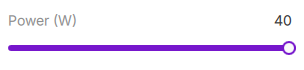
In Cutting Mode, simply set a high enough power level to ensure the selected material and thickness can be cut through reliably. - Unit display: You can switch the power unit between Watts (W) and Percentage (%) in the software settings.
- W (Watts): Displays the absolute output power.
- % (Percentage): Displays the output as a percentage of your laser module’s maximum power.
For example, with a 40W laser module, 100% equals 40W output.
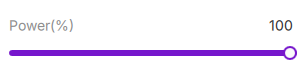
- W (Watts): Displays the absolute output power.
- Range: 0 to the maximum module power (or 0–100%).
¶ 3. Cutting Speed
Controls how fast the laser head moves along the cutting path.
- Setting method: Adjust via slider or manual input.
- Range: 0–600 mm/s
For thicker materials, reduce the cutting speed to ensure full penetration.
For thinner materials, you may increase the speed to minimize burn marks.