¶ 1. Problem Description
If the software cannot recognize the device, or if you encounter a sudden "Device Disconnected" prompt while using Aliencell Space to connect to the Aliencell X1, please follow the steps below to troubleshoot the issue.
¶ 2. Common Causes and Solutions
¶ 2.1 Insufficient Laptop Power Supply
- Analysis: When a laptop is running on battery power with a low charge, Windows automatically enters "Battery Saver" mode. To save power, the system may lower the output voltage of the USB ports or suspend power to them entirely, causing the data transmission to the laser engraver to fail.
- Solution:
- Connect to Power: When using the Aliencell X1 for engraving, please ensure your laptop is connected to its power adapter at all times. Do not rely solely on battery power.
- Disable USB Power Saving Settings (Recommended for Windows):
- Go to Control Panel > Hardware and Sound > Power Options.
- Click Change plan settings next to your current power plan > Change advanced power settings.
- Expand USB settings > USB selective suspend setting.
- Set both "On battery" and "Plugged in" to Disabled.
¶ 2.2 USB Connection Issues
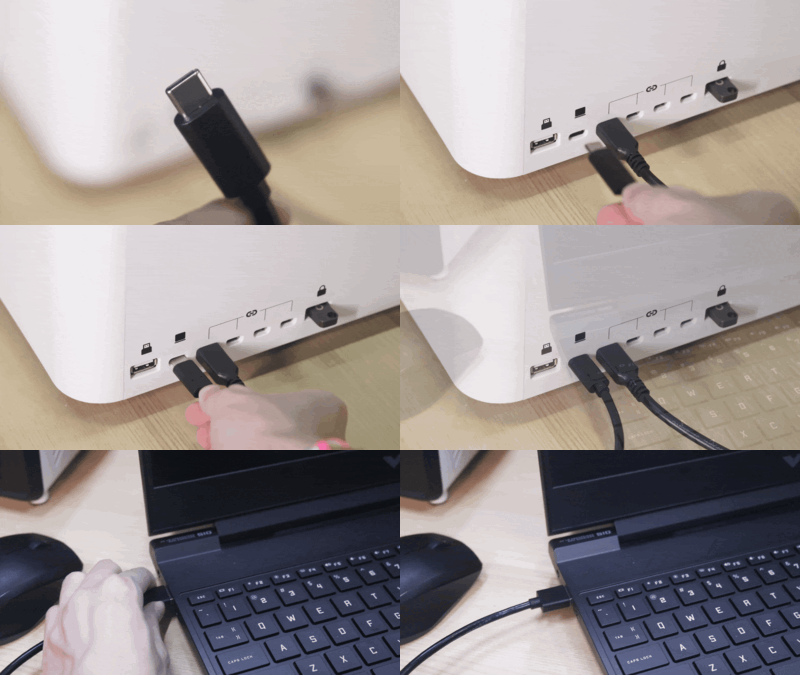
- Use the Official Data Cable: Third-party Type-C or USB cables vary widely in quality. Many standard phone cables are designed for charging only (no data transfer) or lack anti-interference shielding. Laser equipment generates electromagnetic signals during operation, and low-quality cables are susceptible to interference, leading to connection drops. Please strictly use the original black USB data cable included with your Aliencell X1.
1.The official cable undergoes specific anti-interference testing (typically featuring a ferrite core or reinforced shielding) to guarantee stable data transmission. Replacing it with a standard phone cable or using an excessively long cable will very likely result in connection failure or interruptions during engraving.
2.Avoid using USB hubs or extension cables to prevent signal attenuation (signal loss).
- Secure Connections: Unplug and re-insert the cable. Ensure the connectors are fully seated in both the computer port and the machine port with no looseness.
- Switch USB Ports: Try a different USB port on your computer. (If you are using a desktop computer, we recommend using the ports on the back of the tower, as front-panel ports often provide insufficient power).
- Check Cable Orientation: Ensure the USB-A plug connects to the computer and the USB-C plug connects to the machine.
¶ 2.3 System Compatibility Issues
- Analysis: Windows 10 versions prior to 1903 do not support the wired connection method used by this device.
- Solution: Please use the Wi-Fi Connection method, or upgrade your system to the latest Windows 10 (Version 22H2) or Windows 11.
¶ 2.4 Mac Connection Issues
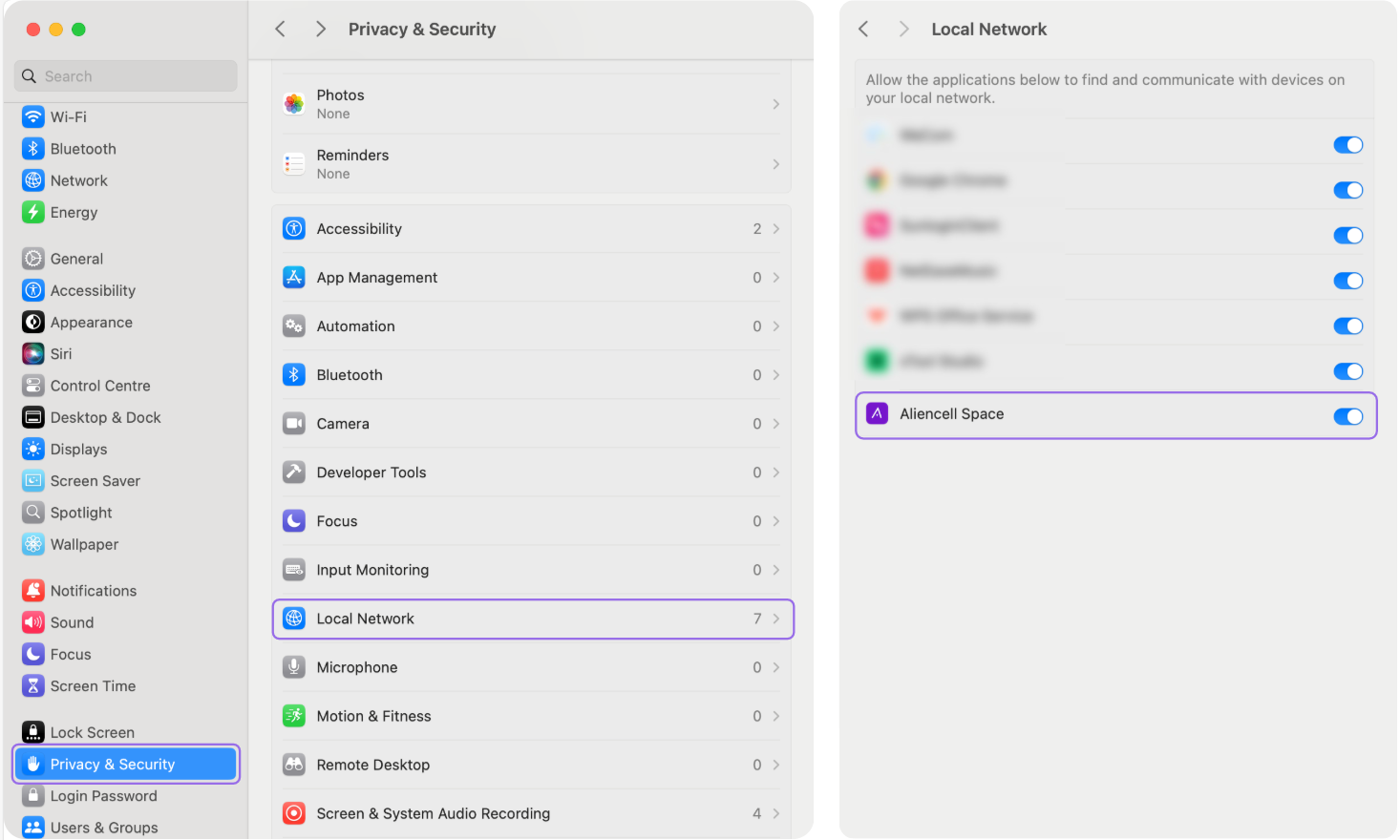
- Issue: On some Mac computers, the software may fail to establish a connection with the device after startup.
- Solution: This is often due to the privacy policies of different macOS versions. If the connection fails, please navigate to System Settings > Privacy & Security. Locate Aliencell Space in the permissions list and ensure its access is enabled (toggled on).
¶ 2.5 VPN / Proxy Software Conflicts
-
Analysis: Some VPN (Virtual Private Network) or proxy clients install a Layered Service Provider (LSP) at the system network stack level to intercept and redirect traffic. This network-level injection conflicts with Aliencell Space's device connection mechanism, causing the software to crash immediately or freeze when you click "Connect Device". Known problematic clients include Astrill VPN, NordVPN, and Proxifier.
-
Solution:
-
Quit VPN Clients: First, fully exit all running VPN or proxy software, then relaunch Aliencell Space and test the connection.
-
Reset LSP Injection (Astrill VPN Example):
- Launch the Astrill VPN client
- Press and hold the Ctrl key, then click the hamburger menu icon (three horizontal lines) in the top-left corner
- From the expanded menu, select Help → LSP Uninstall
- Wait for the operation to complete
- Close the Astrill client and restart your computer
Other VPN software offers similar network reset functions. If the issue persists after quitting the VPN, look for "Network Repair", "Winsock Reset", or "LSP Cleanup" options in the software's settings or help menu.
- System-Level Winsock Reset (Windows): If the methods above fail, reset the Windows network stack via command line:
- Open Command Prompt (CMD) as Administrator
- Type:
netsh winsock reset - Press Enter and restart your computer when prompted
-