This guide explains the differences between the old and new LightBurn configuration files for the Aliencell X1.
The two configuration files use different settings for Pointer Offset, Z-axis control, and exhaust fan behavior. Using a configuration file that does not match your X1 firmware may cause unexpected behavior, such as incorrect processing positions or exhaust fan issues.
[!IMPORTANT]
The X1 firmware and LightBurn configuration file should be kept compatible.Updating the X1 firmware does not automatically update the LightBurn configuration file. If you update the firmware, please also check whether you are using the latest compatible LightBurn configuration file.
¶ 1. Quick Comparison
| Setting | Old Configuration | New Configuration |
|---|---|---|
| Pointer Offset | Enabled | Disabled |
| Y-axis Offset | 23.3 mm | Not used |
| Z-axis | Disabled | Enabled |
| Exhaust Fan | Automatically turns on during processing | Controlled by the Air switch |
| Air Switch Required | Yes | Yes |
| Exhaust Fan Speed | Maximum speed during processing | Maximum speed when Air is enabled |
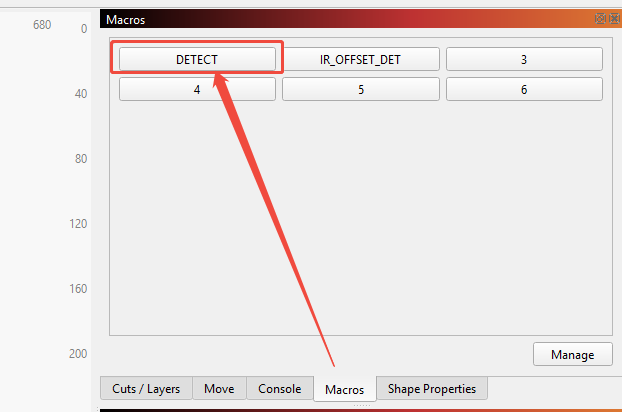
| Auto Focus Location | Macros→Detect | Move→Focus Z |
¶ 2. Old Configuration
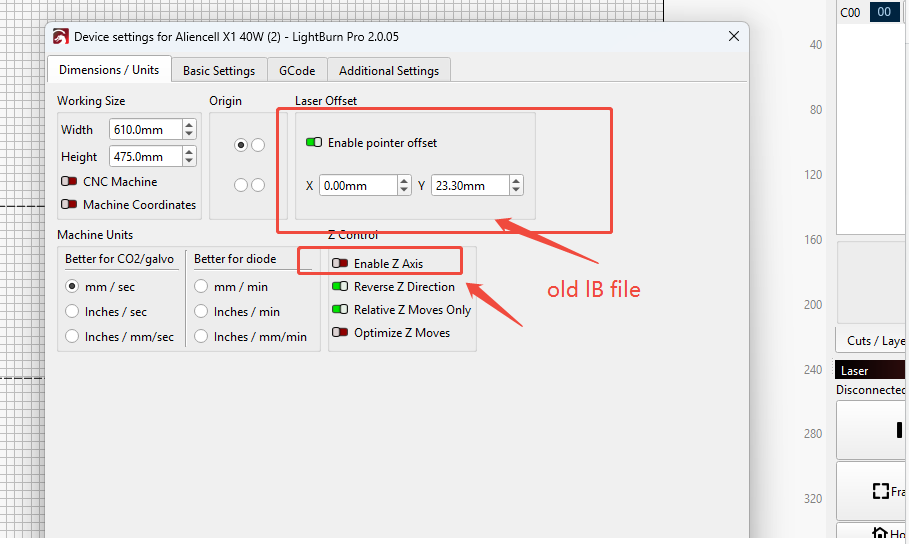
The old LightBurn configuration uses the following settings:
- Pointer Offset: Enabled
- Y-axis Offset: 23.3 mm
- Z-axis: Disabled
- Auto-Focus: Enabled Macros→Detect
¶ Pointer Offset
In the old configuration, the Pointer Offset is enabled with a Y-axis offset of 23.3 mm.
This offset is part of the positioning method used by the older configuration.
[!WARNING]
Do not manually add the 23.3 mm Y-axis offset when using the new configuration.The new configuration uses a different positioning method and has Pointer Offset disabled.
¶ 3. New Configuration
The new LightBurn configuration uses:
- Pointer Offset: Disabled
- Z-axis: Enabled
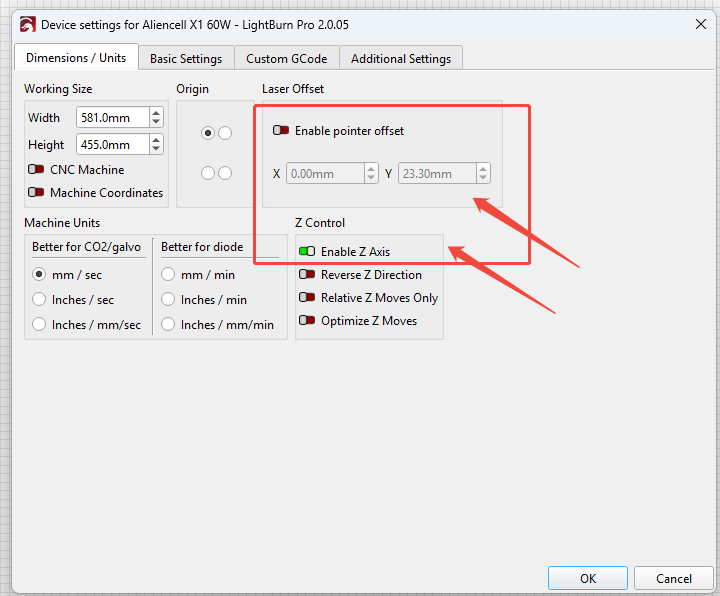
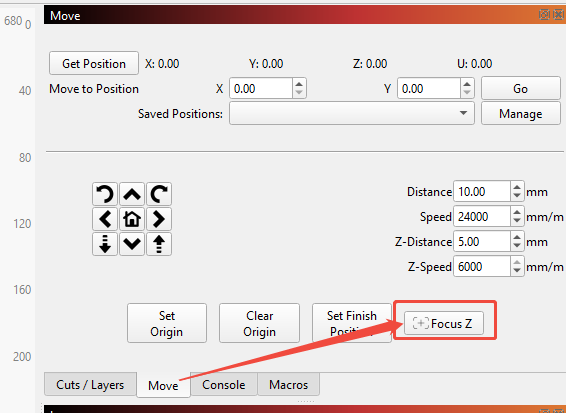
The new configuration uses a different control method, so the old 23.3 mm Y-axis Pointer Offset is no longer required.
[!IMPORTANT]
Do not mix settings from the old and new configurations.If you are using the new configuration, do not manually enable the old Pointer Offset or add the 23.3 mm Y-axis offset unless instructed by Aliencell Support.
¶ 4. Exhaust Fan Behavior
The exhaust fan behaves differently depending on which LightBurn configuration file is being used.
¶ 4.1 Older Configuration
With the older configuration, the exhaust fan:
- Automatically turns on when processing starts.
- Runs at maximum speed during processing.
- Normally remains on for approximately 30 seconds after the job is completed.
- Automatically turns off afterward.
¶ In short
Old configuration → Start processing → Exhaust fan automatically runs at maximum speed.
No additional Air switch operation is required.
¶ 4.2 Newer Configuration
With the newer configuration, the exhaust fan is controlled through the Air switch in LightBurn.
To make the exhaust fan run at maximum speed during processing:
- Open LightBurn.
- Connect the X1.
- Turn on the Air switch.
- Start the processing job.

[!IMPORTANT]
With the new configuration, the Air switch must be enabled for the exhaust fan to run at maximum speed during processing.
¶ In short
New configuration → Enable Air → Start processing → Exhaust fan runs at maximum speed.
If the Air switch is not enabled, the exhaust fan will not behave the same way as it did with the old configuration.
¶ 5. Common Issue: Processing Position Shifts Downward
¶ Symptoms
You may notice that the job randomly shifts downward during processing and then continues from the new position.
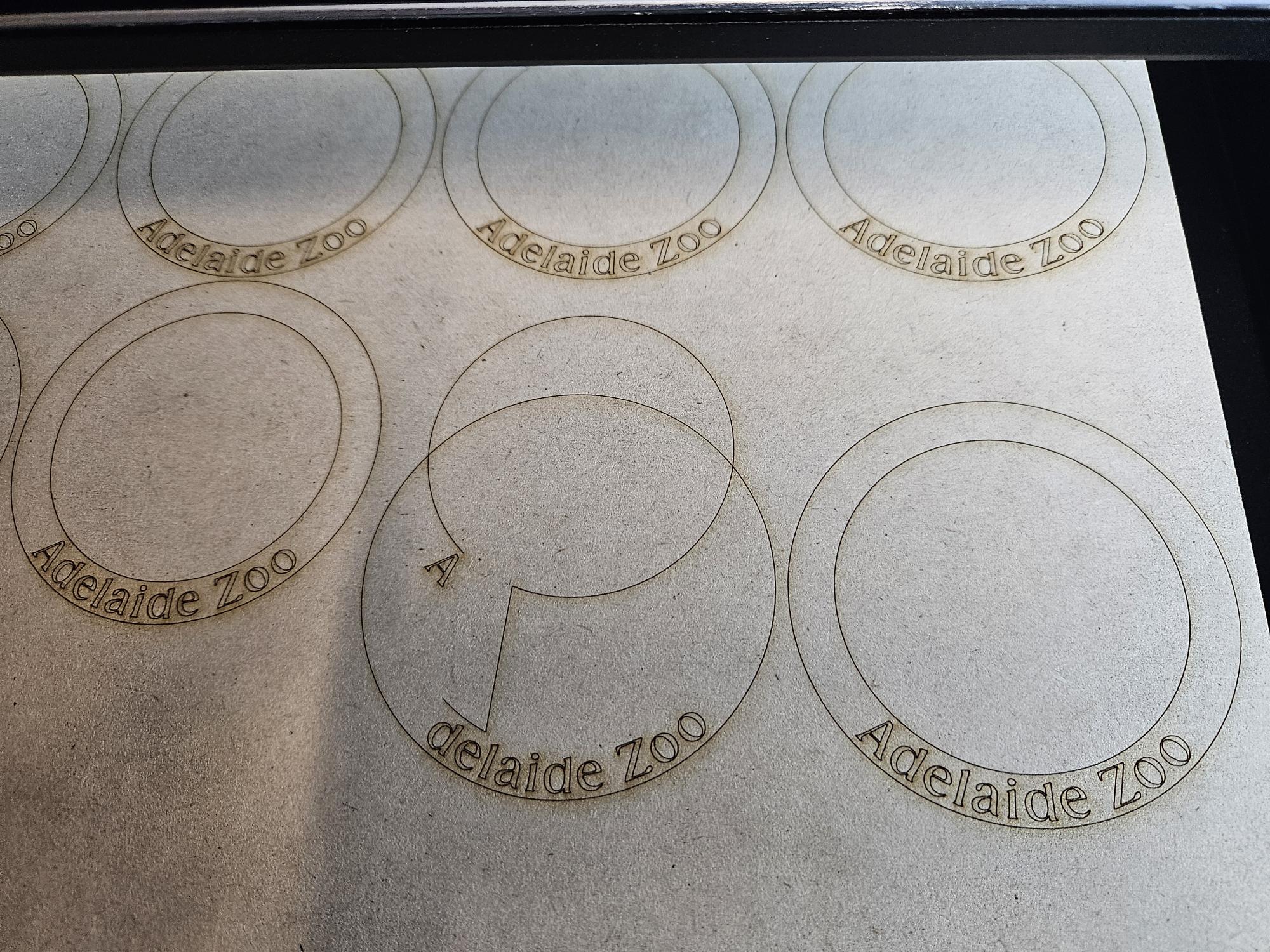
For example:
- The design appears to be positioned correctly in LightBurn.
- The material is positioned correctly.
- However, after starting the job, the actual engraving or cutting position is lower than expected.
¶ Possible Cause: Firmware and Configuration Mismatch
One possible cause is that the X1 firmware has been updated, but the LightBurn configuration file has not been updated accordingly.
For example:
Latest X1 firmware + Old LightBurn configuration = Possible positioning issues
The firmware and LightBurn configuration contain related positioning and control settings.
If an older configuration is used with newer firmware, LightBurn may send commands that are not interpreted as expected by the updated firmware.
This may result in:
- Unexpected Y-axis offset
- Processing position shifting downward
- Incorrect pointer positioning
- Unexpected Z-axis behavior
- Other positioning inconsistencies
¶ 6. Why Does This Happen?
The old and new configurations use different positioning logic.
The old configuration relies on:
- Pointer Offset enabled
- 23.3 mm Y-axis offset
- Z-axis disabled
The new configuration relies on:
- Pointer Offset disabled
- Z-axis enabled
Therefore, using the wrong configuration can cause LightBurn and the X1 firmware to interpret positioning commands differently.
[!IMPORTANT]
Do not assume that updating the firmware automatically updates LightBurn.Firmware and LightBurn configuration files are updated separately.
¶ 7. How to Check Which Configuration You Are Using
Open LightBurn → go to Device Settings
¶ 8. Do Not Mix Old and New Settings
The old and new configuration files use different control logic.
For this reason, manually combining settings from the two configurations is not recommended.
Avoid combinations such as:
- New firmware + old Pointer Offset
- New firmware + old 23.3 mm Y-axis offset
- New configuration + manually enabled Pointer Offset
- New configuration + manually added Y-axis offset
- New configuration + manually changed Z-axis settings
These combinations may result in unexpected positioning or processing behavior.
[!WARNING]
Please use the complete configuration file provided for your X1 instead of manually copying individual settings between configuration versions.
¶ 9. Firmware and LightBurn Configuration
It is important to understand that firmware updates and LightBurn configuration updates are separate.
¶ Firmware
The firmware controls the behavior of the X1 itself.
¶ LightBurn Configuration
The LightBurn configuration tells LightBurn how to communicate with and control the X1.
Therefore:
Updating the firmware does not automatically update the LightBurn configuration.
After a firmware update:
- Check the current X1 firmware version.
- Check whether a new LightBurn configuration file is available.
- Import the latest compatible configuration file.
- Restart LightBurn if necessary.
- Perform a small test job.
¶ 10. Exhaust Fan Troubleshooting
If the exhaust fan does not turn on as expected when using LightBurn, first determine which configuration you are using.
¶ If You Are Using the Old Configuration
The exhaust fan should:
- Turn on automatically when processing starts.
- Run at maximum speed during processing.
- Turn off approximately 30 seconds after processing is completed.
If this does not happen, check:
- X1 connection
- LightBurn device configuration
- Firmware version
- Whether the correct configuration file is installed
¶ If You Are Using the New Configuration
First check whether the Air switch is enabled.
Make sure:
- X1 is connected.
- The correct configuration file is loaded.
- Air is enabled before starting the processing job.
[!IMPORTANT]
If the Air switch is disabled, the exhaust fan will not run at maximum speed during processing with the new configuration.
¶ 11. Recommended Setup
For the best experience when using the X1 with LightBurn:
- Keep the X1 firmware up to date.
- Use the latest compatible LightBurn configuration file.
- Do not mix settings from different configuration versions.
- After updating the firmware or configuration, perform a small test job.
- If the processing position is incorrect, check the configuration file before assuming there is a hardware issue.
- If the exhaust fan does not behave as expected, check the Air switch and configuration version first.
¶ 12. Quick Troubleshooting Guide
| Problem | Possible Cause | Recommended Action |
|---|---|---|
| Processing shifts downward | Old configuration used with newer firmware | Import the latest compatible configuration |
| Pointer position is incorrect | Incorrect Pointer Offset | Check Pointer Offset settings |
| Unexpected Y-axis offset | Old 23.3 mm offset is still enabled | Use the new configuration |
| Z-axis does not work | Z-axis is disabled in the old configuration | Use the new configuration |
| Exhaust fan does not start automatically | New configuration is being used | Enable the Air switch |
| Exhaust fan behavior differs from before | Configuration file has changed | Check which configuration is currently installed |
| LightBurn behavior changed after firmware update | Firmware/configuration mismatch | Update the LightBurn configuration |
¶ 13. Still Having Problems?
Please provide the following information to Aliencell Support:
- X1 firmware version
- LightBurn version
- LightBurn configuration file/version
- Screenshot of the relevant LightBurn settings
- Photo or video showing the issue, if possible
This information will help us determine whether the issue is related to the LightBurn configuration, firmware, or machine setup.
¶ 14. Key Takeaways
[!TIP]
¶ Remember These Three Things
1. Old Configuration
Pointer Offset ON → Y Offset 23.3 mm → Z-axis OFF
2. New Configuration
Pointer Offset OFF → Z-axis ON → Air switch required for maximum exhaust fan speed
3. Firmware Update
Updating firmware does not automatically update the LightBurn configuration. Always make sure the configuration file matches the current firmware.