¶ Support & Service
¶ 1. Model Selection & Core Specifications
¶ Q1: What laser power options does the Aliencell X1Lite offer, and what are the differences?
A: We offer diode laser modules in three power levels: 20W, 40W, and 60W.
- 20W: Ideal if you prioritize extreme precision in engraving and cutting medium-thickness materials. It features the finest laser spot size.
- 40W: The balanced choice. It offers a perfect compromise between high-definition engraving and powerful cutting capabilities (e.g., cutting 15-20mm wood).
- 60W: Designed for heavy-duty cutting. It possesses ultra-strong penetration power, making it suitable for processing thick plates and high-efficiency production.
¶ Q2: What are the maximum engraving speed and acceleration of the X1 Lite?
A: The machine supports a maximum acceleration of 20,000 mm/s². You can adjust acceleration settings in the software (e.g., 10,000 mm/s² or 2,000 mm/s²) to optimize processing effects based on your needs. The maximum engraving speed is 600mm/s.
¶ Q3: What materials can the X1Lite process?
A: The X1 Lite supports processing for over 300 types of materials:
- Engrave & Cut: Wood, Acrylic, Leather, Cardboard, Paper, Delrin, Cork, etc.
- Engrave Only: Slate, Titanium, Aluminum, Marble, Ceramic, Glass (requires pretreatment), Stainless Steel, etc.
¶ Q4: What is the actual cutting capability of the 40W laser module?
A: The 40W module features powerful cutting performance, capable of cutting through thick materials in a single pass. For example, it has the potential to cut 15mm Basswood (Note: Specific parameters depend on material density and environmental conditions. More material test data is continuously being updated).
¶ Q5: What is the expected lifespan of the laser module?
A: Aliencell uses high-quality laser diodes. Under normal operating conditions, the expected lifespan of the laser head is over 10,000 hours. We offer standalone laser modules for purchase to facilitate future maintenance.
¶ 2. Dimensions, Workspace & Installation
¶ Q6: What is the actual effective work area?
A: The work area varies slightly depending on the power version:
- 20W & 40W Versions: 24.02 x 18.31 inches (approx. 610 x 465 mm), slats or honeycomb mode
- 60W Version: 23.43 x 17.91 inches (approx. 595 x 455 mm), slats or honeycomb mode
¶ Q7: How large of a table do I need to accommodate this machine?
A: Considering the bend radius of the exhaust pipe at the rear and the space for the air pump on the right, we recommend:
- Minimum Reserved Space: 38 x 35 inches (96.5 x 89 cm)
- Recommended Comfortable Space: 40 x 35 inches (101.6 x 89 cm) or larger to ensure ease of operation.
¶ Q8: What is the material thickness range for the Aliencell X1Lite series?
A: The effective processing range for the X1 Lite depends on your base configuration:
- Slats Support: 0.1 mm - 25.0 mm.
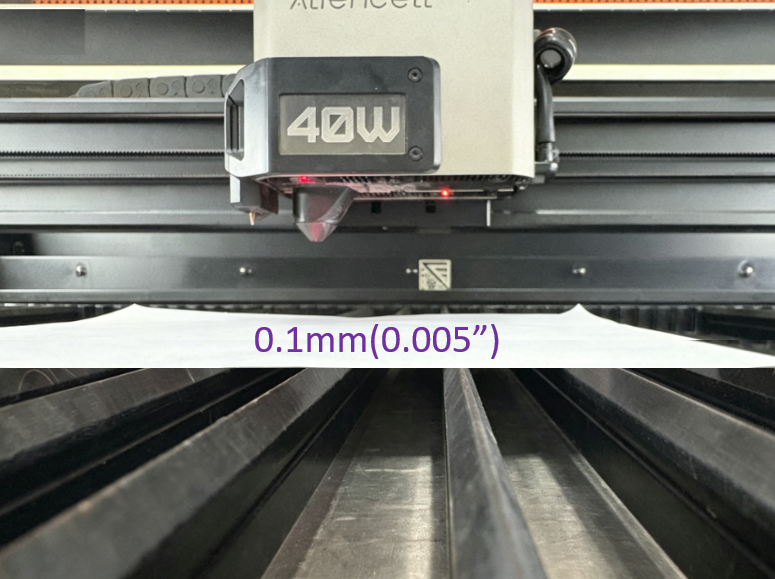 |
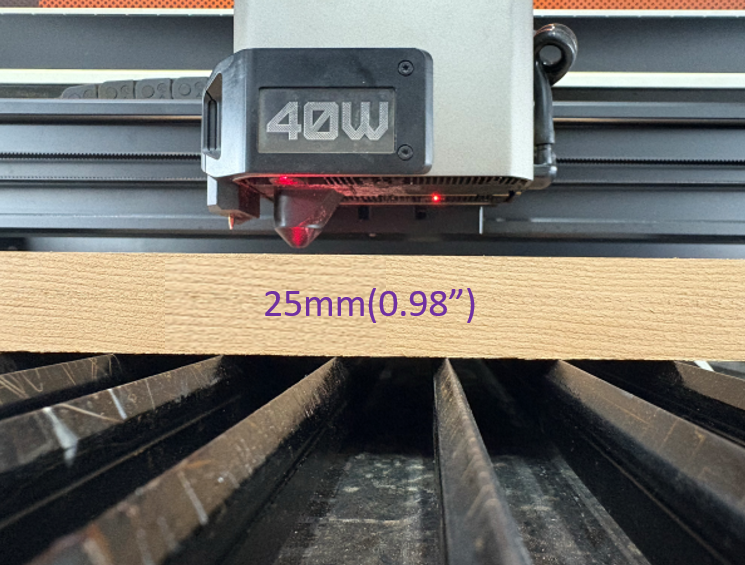 |
|---|---|
| Min: 0.1 mm | Max: 25 mm |
- Flat Base: 20.0 mm - 50.0 mm.
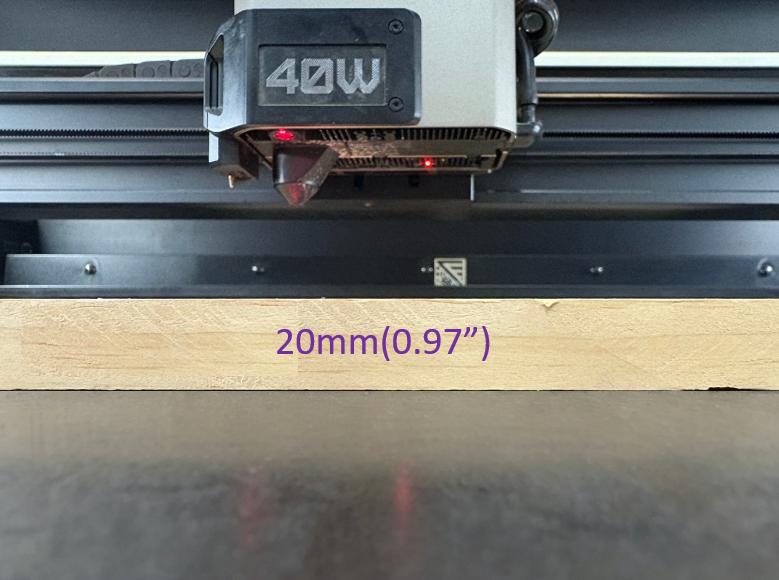 |
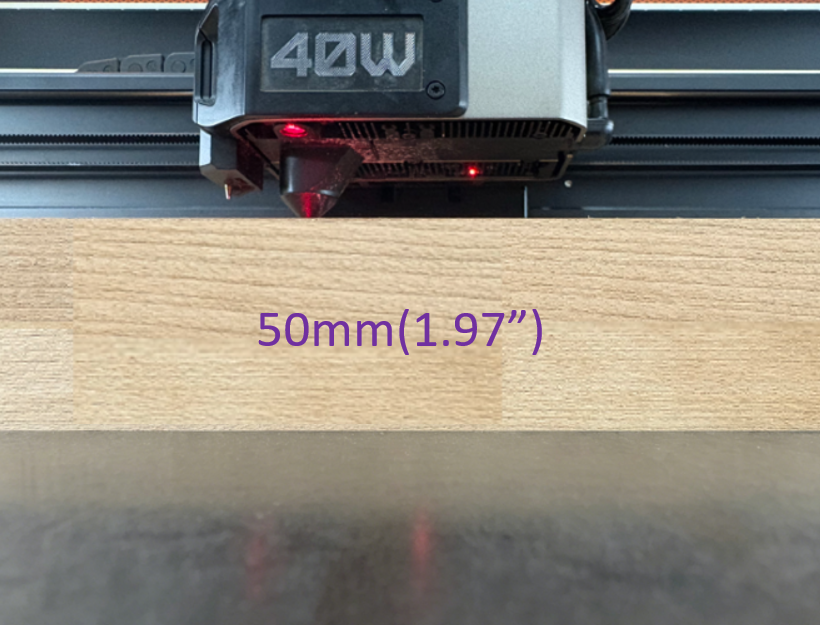 |
|---|---|
| Min: 20 mm | Max: 50 mm |
¶ Q9: What is the maximum material thickness supported?
A:
- Standard Mode (Baseplate installed): Supports materials up to approx. 25mm thick when using manual focus or auto-focus.
- Extension Mode: For engraving taller objects, the bottom baseplate can be removed, and the machine can be raised using risers (sold separately) to achieve unlimited Z-axis height.
¶ Q10: Does the machine support a Rotary Attachment?
A: Yes, the machine features a dedicated internal interface for rotary attachments. It connects seamlessly with Roller or Chuck style rotaries for engraving cylindrical items like tumblers and rings.
¶ 3. Software Control
¶ Q11: Is it compatible with LightBurn?
A: Yes, the X1Lite is fully compatible with LightBurn. We provide an official configuration file (.lbdev) which, once imported, perfectly adapts all machine functions.
However, for beginners, we recommend using our self-developed control software, Aliencell Space. It deeply integrates X1 Lite's hardware features, offering a more intuitive interface and a smoother experience.
¶ Q12: What is the function of the Crosshair Laser?
A: The red crosshair laser, combined with the smart encoder positioning system, allows you to visually preview the engraving position on the material without firing the main laser, ensuring fast and safe alignment.
¶ Q13: What connectivity options does the machine support?
A: The X1 Lite provides the following connectivity options: Wi-Fi wireless communication, USB Type-C wired connection:
- PC Communication: Supports Wi-Fi wireless connection (2.4GHz band only) or USB Type-C wired connection.
- Smart Accessory Communication: Connects to intelligent accessories (such as the Smart Air Pump or Air Purifier) via USB-B.
¶ 4. Intelligence & Usability
¶ Q14: Does the X1Lite support camera positioning?
A: No. The X1 Lite is the budget-friendly version that does not include a camera module, therefore camera positioning and live preview are not supported.
If you need visual features like camera positioning and panoramic preview, we recommend upgrading to the full 👉 Aliencell X1 version.
¶ Q15: I am new to laser engraving. Is this machine hard to use?
A: Not at all. The X1 Lite is designed for all skill levels, including beginners:
- Auto Parameter Recommendation: Combined with Aliencell Space software, the system recommends parameters based on the material and provides a "What You See Is What You Get" real-time rendering preview.
- Auto-Focus: Eliminates tedious manual focusing; the machine automatically detects the material surface and adjusts to the optimal focal length.
- One-Key Repeat: Supports repeating the last job with a single button press, perfect for both beginners and batch production.
¶ Q16: Does the machine support power-off resume?
A: Yes. The X1 Lite features power-off memory. If power is lost during operation, the machine will prompt you to resume upon restarting. Once confirmed, it will return precisely to the interruption point and continue working, preventing material waste.
¶ 5. Safety, Accessories & Maintenance
¶ Q16: What is the safety classification of the X1 Lite? What safety measures does it have?
A: The X1 Lite utilizes a fully enclosed design and holds a Class 1 laser safety certification. Under normal operation (lid closed), laser radiation is completely shielded, allowing you to view the machine without safety goggles. Additional safety features include:
- Lid-Open Stop: The laser stops immediately if the lid is opened during operation.
- Flame Monitoring: 6 high-sensitivity flame sensors (5 inside the chassis, 1 on the laser module) will automatically stop the machine and trigger an alarm if a flame is detected.
- Tilt/Impact Protection: The machine automatically locks down if abnormal movement or tilting is detected.
¶ Q17: How do X1Lite flame detection sensors detect flames?
A: X1 Lite's flame sensors are essentially specialized infrared spectrum detectors designed to recognize the unique optical "fingerprint" produced during combustion. When materials burn, the oxidation reaction of hydrocarbons releases infrared radiation at a specific 4.3μm wavelength—this is a unique spectral characteristic of flames. Ordinary lights, sunlight, and heated materials do not produce radiation in this frequency band. Through cross-validation of 6 sensors and intelligent algorithm judgment, the system can accurately distinguish between real flames and environmental interference.
👉 Learn more: How X1 Lite Flame Sensors Work
¶ Q18: What happens to the device when a flame is detected?
A: When the system confirms detection of real flame characteristics, it immediately triggers a complete safety response:
- Buzzer alarm sounds, button red light flashes
- Flame alarm displayed on UI/host/APP
- Processing task stops immediately, laser output ceases (core protection feature, available on all devices)
- Cooling fan, exhaust fan, air pump, and air purifier stop running
- If the official optional CO₂ fire extinguishing device is installed, it will automatically release extinguishing gas
- Other operations are prohibited during the alarm; the hazard must be eliminated before restarting the device
👉 Learn more: How X1 Lite Flame Sensors Work
¶ Q19: Is the air pump internal or external? What are the specs?
A: The X1 Lite is equipped with a smart air assist system designed for an external high-performance air pump (connects to the right side of the machine). We recommend the official Aliencell air pump, which offers pressure up to 14.5 PSI (approx. 100kPa)—several times stronger than standard built-in pumps. This strong airflow effectively blows away cutting smoke, prevents wood charring, and significantly improves cutting depth and edge cleanliness.
¶ Q20: Does the air pump support automatic control?
A: Yes. You can set the air pump to "Auto" mode via the software. The machine will automatically start and stop the pump based on the processing file instructions (e.g., low airflow for engraving, high airflow for cutting), requiring no manual switching.
¶ Q21: How should I handle the smoke produced?
A: The X1 Lite features a large-diameter exhaust vent on the back. You can connect the included exhaust hose to vent smoke outdoors. For indoor use, we recommend pairing the machine with the Aliencell Smoke Purifier, which links with the machine to efficiently filter PM2.5 and harmful gases.
¶ Q22: How do I clean and maintain the laser lens?
A: The lens is a consumable part, and keeping it clean is crucial. We recommend checking it every 4-5 hours of operation (or every 2-3 hours if cutting heavily). Use a cotton swab dipped in anhydrous ethanol (99% alcohol) to gently wipe the lens surface. The X1 Lite module features a unique dust-proof air duct design to help extend cleaning intervals.
¶ 6. Lightburn FAQs
¶ Q23: Is LightBurn free?
No. LightBurn is paid software.
Note: LightBurn officially offers a 30-day fully functional free trial. We recommend downloading and trying it out before purchasing.
¶ Q24: Which License Key should I purchase?
Please purchase the G-Code License Key.
To ensure stable communication between the software and the machine, as well as full functionality, we recommend using LightBurn version 2.0 or higher.
¶ Q25: Can I set up a Wi-Fi connection to the machine in LightBurn?
No.
Wi-Fi setup is not supported in LightBurn. Please use a USB cable.