¶ 1.Troubleshooting Procedure
The machine may encounter problems during operation. Causes can include hardware connections, software errors, network issues, user settings, material properties, or environmental factors.
You can view these codes:
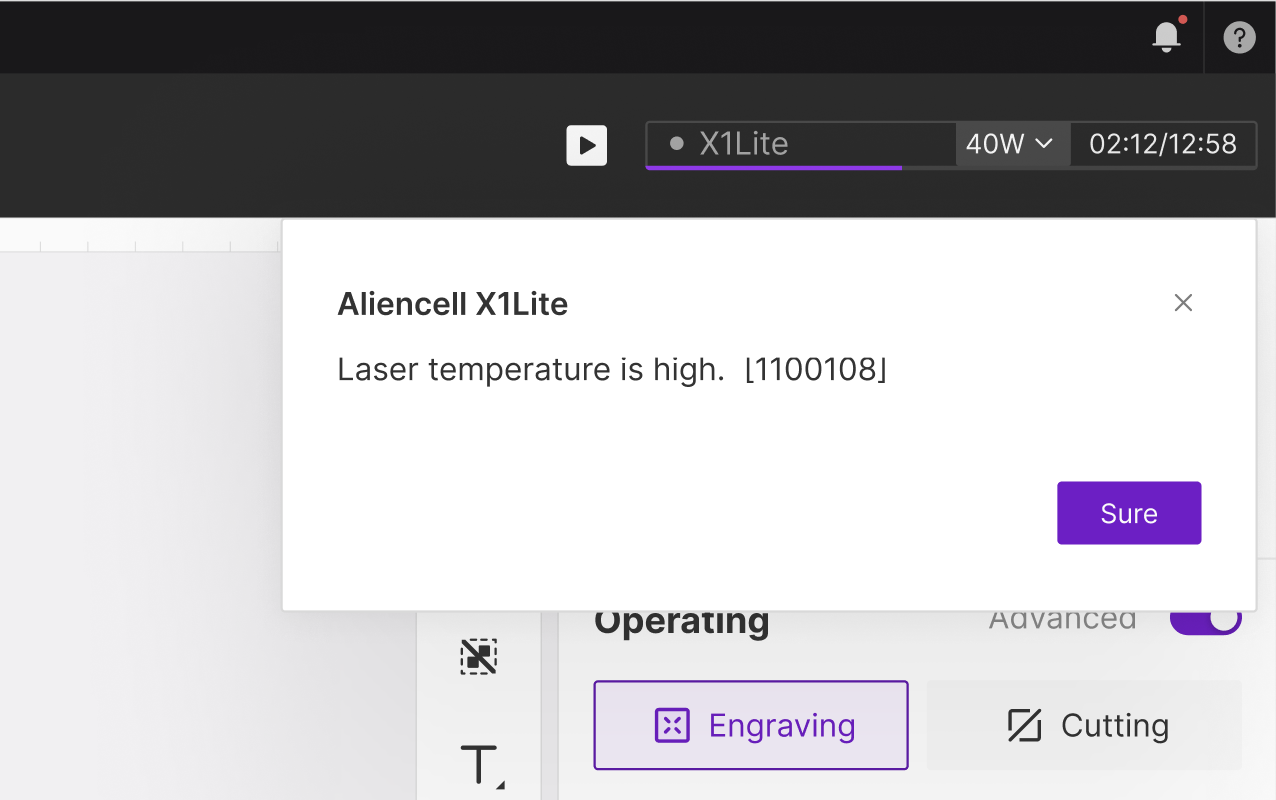
- In the PC software when an error pop-up appears.
Please use the module code above to locate your specific error code. Based on those error codes, you can find the likely cause and recommended action in the table below.
| Error Code | Description | Recommended Action |
|---|---|---|
| 1100101 | Laser module signal abnormality. Please check that the laser module is correctly installed. [1100101] | Power off the machine and reseat the laser module. Make sure the module is fully seated in the mount and that the pins and cables are clean, secure, and undamaged. If the error remains after restarting, export the error information and contact Support to check the laser module or main-control communication. Reference manual: Replace the laser moudle |
| 1100102 | Laser module temperature sensor abnormality. [1100102] | Do not continue processing while the temperature sensor is abnormal. Power off the machine, reinstall the laser module, and check the connector. If the error remains after restart, contact Support and treat it as a laser-module fault. Reference manual: Replace the laser moudle |
| 1100103 | Device accelerometer abnormality. [1100103] | Check that the machine is placed on a stable, level surface and that it was not bumped or shaken during operation. If the error remains after restart, contact Support to inspect the laser-module accelerometer or control board. |
| 1100104 | Laser module cooling abnormality. Please check cable connections and fan speed for any issues. [1100104] | Check whether the laser-module cooling fan is blocked by dust, jammed by debris, or affected by a loose cable. Clean the fan and heat sink, then restart the machine. If the error persists, contact Support to inspect the fan or laser module. Reference manual: Deep Clean: Laser Module & Cooling Fans, Laser Module High Temperature Alarm |
| 1100105 | Laser module cooling abnormality. Please check cable connections and fan speed for any issues. [1100105] | Check that the laser-module cooling fan spins freely, then remove dust from the fan blades and heat sink. If the error appears repeatedly during processing, pause the job, allow the module to cool, and contact Support to verify the fan-speed feedback. Reference manual: Deep Clean: Laser Module & Cooling Fans, Laser Module High Temperature Alarm |
| 1100107 | Laser device accelerometer signal abnormality. [1100107] | Make sure the machine is level and the laser module is firmly installed. Avoid moving or bumping the machine during operation. If the warning remains after restart, contact Support to check the laser accelerometer connection. |
| 1100108 | Laser device temperature is too high. [1100108] | Pause processing immediately and keep the machine powered on for 5-10 minutes so the cooling fan can run. Check that the laser cooling fan is operating and that the heat sink is not clogged with dust. Clean the cooling system before resuming. For dusty materials or long jobs, process in sections and reduce power as needed. Reference manual: Laser Module High Temperature Alarm, Deep Clean: Laser Module & Cooling Fans |
| 1200101 | X-axis motor signal abnormality. Please check the motor and its connections. [1200101] | Power off the machine and check the X-axis motor cable, connectors, and motion path for obstruction or binding. Move the X axis by hand to confirm smooth travel. If the error persists, contact Support to inspect the motor, driver board, or main board. Reference manual: Replace Motor Driver Board |
| 1200102 | X-axis motor drive abnormality. [1200102] | Restart the machine and confirm that the X axis is not jammed and that the belt and rail are free of debris. If the error repeats, contact Support to inspect the motor driver board. Reference manual: Replace Motor Driver Board |
| 1200103 | X-axis limit switch abnormality. Please check the limit switch and its connection. [1200103] | Check whether material or debris is blocking the X-axis homing path, and confirm that the limit switch and cable are secure. Clear the obstruction and home the machine again. If homing still fails, the limit switch should be inspected. Reference manual: X/Y/Z Axis Limit Switch Troubleshooting |
| 1200201 | Y-axis motor signal abnormality. Please check the motor and its connections. [1200201] | Power off the machine and check the Y-axis motor connection, timing belt, and guide rails. Confirm that the axis can move without obstruction. If reset still fails after restart, contact Support to inspect the motor or driver board. Reference manual: Replace Motor Driver Board |
| 1200202 | Y-axis motor drive abnormality. [1200202] | Check whether the Y axis is jammed or moving unevenly from side to side. Clean the guide rails and restart the machine. If the driver error continues, contact Support to inspect the motor driver board. Reference manual: Replace Motor Driver Board |
| 1200203 | Y-axis limit switch abnormality. Please check the limit switch and its connection. [1200203] | Check for debris around the Y-axis limit switch and make sure the cable is secure. Move the gantry by hand to confirm it can home smoothly. If the error remains, contact Support to inspect the limit switch. Reference manual: X/Y/Z Axis Limit Switch Troubleshooting |
| 1200301 | Z-axis motor signal abnormality. Please check the motor and its connections. [1200301] | Check whether the Z-axis lift is blocked by the material, honeycomb panel, or probe mechanism, and confirm that the motor cable is secure. If the error remains after homing again, contact Support to inspect the Z-axis motor. Reference manual: Focusing Methods |
| 1200302 | Z-axis motor drive abnormality. [1200302] | Make sure the Z axis is not mechanically jammed and that the material is not pressing against the laser module. If the driver error remains after restart, contact Support to inspect the Z-axis drive system. Reference manual: Focusing Methods, Replace Motor Driver Board |
| 1200303 | Z-axis limit switch abnormality. Please check the limit switch and its connection. [1200303] | Check whether the Z-axis limit or homing position is blocked by debris, and confirm that the lift path is clear. If the error remains, contact Support to inspect the limit switch or cable. Reference manual: X/Y/Z Axis Limit Switch Troubleshooting |
| 1200304 | Motor mainboard communication abnormality. [1200304] | Restart the machine and check the motion-control board connections. If the error appears repeatedly, it is a control-board communication issue. Export the logs and contact Support. |
| 1300101 | Smoke exhaust fan signal abnormality. Please check the hardware connection. [1300101] | Check the exhaust-fan cable and installation, and make sure the fan has not come loose. If this is only a warning and strong exhaust is not required, the job can continue. For smoke-heavy materials, repair the exhaust system first. Reference manual: Weak Exhaust Airflow & Low Suction Power, Cleaning the Smoke Exhaust Module |
| 1300102 | Smoke exhaust fan speed abnormality. Please check whether the fan has debris or damage. [1300102] | Check the exhaust-fan blades for chips, dust buildup, or foreign objects. Clean the exhaust fan and try again. If the error remains, inspect the fan for damage. Reference manual: Cleaning the Smoke Exhaust Module, Weak Exhaust Airflow & Low Suction Power |
| 1300103 | Air purifier connection abnormality. Please check the hardware connection. [1300103] | Check the camera ribbon cable or connector and restart the machine. If you are using crosshair positioning or manual positioning only, the photo-capture function can be left unused for now. Reference manual: Calibrating Photo Positioning Accuracy Deviations, Photo capture calibration |
| 1300104 | Air assist pump connection abnormality. Please check the hardware connection. [1300104] | Make sure the air purifier is powered on, the cable or Bluetooth connection is working, and reconnect it from the machine or software. If no air purifier is being used, this accessory warning can be ignored. Reference manual: Installation and Connection, Filter Not Detected |
| 1400101 | Flame sensor abnormality. Please check the hardware connection. [1400101] | Check the flame-sensor connection and make sure the sensor window is not covered by smoke residue. Clean the sensor and restart the machine. Flame detection is a safety feature and should not be disabled for long-term use. Reference manual: Flame Safety Device Setup, Flame Detection Sensor Cleaning |
| 1400103 | X-axis encoder abnormality. Please check the hardware connection. [1400103] | Check the X-axis encoder connection, inspect the rail for binding, and confirm that axis movement is normal. Because the encoder is part of motion feedback, do not continue processing if the error repeats. |
| 1400104 | Y-axis encoder abnormality. Please check the hardware connection. [1400104] | Check the Y-axis encoder connection, timing belt, and gantry movement. Repeated encoder errors may affect processing accuracy, so processing should not continue until the issue is resolved. |
| 1444102 | Moderate flame detected. Safety hazard! Operation stopped. Please take action immediately. [1444102] | - |
| 1444103 | Severe flame detected. Safety hazard! Operation stopped. Please take action immediately. [1444103] | - |
| 6510100 | File transfer complete. [6510100] | - |
| 6510101 | File transfer server is ready. [6510101] | - |
| 1510101 | File verification failed. [1510101] | - |
| 1510102 | The machine is busy. Please try again later. [1510102] | - |
| 6511100 | Calibration complete. [6511100] | - |
| 1511101 | Motion control calibration failed. Please manually start device calibration. [1511101] | - |
| 6513100 | Measurement successful! [6513100] | - |
| 1513101 | Device not reset. Please complete the reset first. [1513101] | The machine has not completed reset. Perform reset/homing first, and make sure the X, Y, and Z motion paths are not blocked by material or debris before starting a job. |
| 1513102 | Probe failed to deploy. Please check the distance sensor. [1513102] | If the probe fails to retract, first check whether the laser module is fully seated, whether the X-axis gantry is misaligned, and whether there is debris near the probe retraction dock. Follow the probe retraction troubleshooting procedure. Reference manual: Distance Sensor Probe Retraction Failure Troubleshooting, Distance Sensor Troubleshooting, Focusing Methods |
| 1513103 | The workpiece exceeds the maximum machinable height of the device. Please adjust the height of the workpiece. [1513103] | Check whether the material exceeds the maximum processable height. Lower the material or remove the riser or honeycomb panel and try again. Also confirm that the probe can extend and retract freely. Reference manual: Focusing Methods, Distance Sensor Troubleshooting |
| 1513104 | Measurement failed. Please manually move the laser to a new measurement point and press the measure button. [1513104] | Select a flatter point on the material surface and run focus again. Check whether the probe can extend normally. If needed, use manual distance entry or point measurement instead. Reference manual: Focusing Methods, Distance Sensor Troubleshooting |
| 1513105 | Probe retraction failed. Please check the distance sensor. [1513105] | Follow the probe retraction troubleshooting procedure: check laser-module installation, the retraction dock position, X-axis gantry alignment, and whether the probe is sticking. Reference manual: Distance Sensor Probe Retraction Failure Troubleshooting, Distance Sensor Troubleshooting |
| 1513106 | Measurement stopped abnormally. [1513106] | Run measurement or focusing again. Make sure the material is flat and the probe path is clear. If the error continues, inspect the probe module or use manual distance entry, then contact Support. Reference manual: Focusing Methods, Distance Sensor Troubleshooting |
| 1513107 | Measurement position is out of working range. Please select a new measurement position. [1513107] | The focus point is outside the measurable Z-axis range. Select another point on the material surface, confirm that the material height is within the machine's supported range, and lower the material if necessary. Reference manual: Focusing Methods, Distance Sensor Troubleshooting |
| 1513108 | Measurement error. [1513108] | Restart the machine and run focus again. Check material flatness, probe movement, and laser-module installation. If focusing still fails, use manual distance entry and contact Support. Reference manual: Focusing Methods, Distance Sensor Troubleshooting |
| 1513109 | Distance sensor not installed. [1513109] | - |
| 6515100 | Log export complete. [6515100] | - |
| 1515101 | Log export failed. [1515101] | - |
| 1515102 | Log file not found. [1515102] | - |
| 1515103 | Log export failed. [1515103] | - |
| 1515104 | Log file export failed due to insufficient storage space. [1515104] | - |
| 1520101 | Invalid parameter. [1520101] | Repeat the current operation and confirm that the input parameters are valid. If the error is triggered automatically by the software, restart the software and machine, then try again. If it persists, submit logs to Support. |
| 1520102 | System initialization incomplete. [1520102] | Wait until machine initialization is complete before operating. If initialization takes unusually long, restart the machine and check the connection status. |
| 1520103 | The device is busy. Please try again later. [1520103] | - |
| 1520104 | Device locked. Please insert the U-key. [1520104] | Reinsert the USB Key and make sure it has a secure connection. If the machine is locked for safety, restore the USB Key before processing. Reference manual: USB Connection Issues |
| 6666666 | Operation complete. [6666666] | - |
| 1666100 | Please close the top cover before starting the operation. [1666100] | Close the lid before starting the job. This is a safety interlock and should not be bypassed. |
| 1666101 | Please close the tray before starting the operation. [1666101] | Make sure the tray is fully pushed into the closed position, and check whether the tray-detection switch is blocked by debris. Reference manual: Tray Detection Function |
| 1666103 | Device locked. Please insert the U-key. [1666103] | - |
| 1666104 | The device is busy. Please try again later. [1666104] | Wait for the previous job to finish, or safely cancel/stop the current job before starting a new one. |
| 1666106 | The device is restarting. Please try again later. [1666106] | Wait until the machine has finished restarting and initialization before starting the job. If initialization takes too long, restart the machine and check the software connection. |
| 1666110 | The device is busy. Please try again later. [1666110] | Wait until the current machine action is complete. If the software status appears stuck, restart the software and machine before starting the job again. |
| 1666112 | Measurement position is abnormal. [1666112] | - |
| 1666113 | Smoke exhaust fan not detected. Continue anyway? [1666113] | - |
| 1666115 | Failed to start operation. Laser signal abnormality. Please check that the laser is correctly installed. Always power off before connecting or disconnecting the laser to avoid damage. [1666115] | Power off the machine and reinstall the laser module, making sure the connection is secure. Do not plug or unplug the laser module while the machine is powered on. If the error remains, inspect the laser module or connector. Reference manual: Replace the laser moudle |
| 1666116 | Failed to start operation. Motor status is abnormal. [1666116] | Check whether any axis is jammed, whether homing has completed, and whether the motor cables are loose. If the error remains after restart, contact Support to inspect the motion system. Reference manual: Replace Motor Driver Board |
| 1666117 | Laser temperature sensor abnormality. Unable to monitor laser temperature. Continuing is not recommended. Continued use may cause laser damage, which is not covered by warranty. Please contact after-sales support. [1666117] | Do not continue processing when the temperature sensor is not detected. Power off the machine, reinstall the laser module, and check the connector. Continued use may damage the laser module. Reference manual: Replace the laser moudle, Laser Module High Temperature Alarm |
| 1666118 | Laser temperature sensor reading too high. Continuing is not recommended. Continued use may cause laser damage, which is not covered by warranty. Please contact after-sales support. [1666118] | If the laser temperature is too high, pause processing and allow the module to cool. Clean the cooling fan and heat sink. Do not force the job to continue after repeated alarms. Reference manual: Laser Module High Temperature Alarm, Deep Clean: Laser Module & Cooling Fans |
| 1666200 | The cover was opened during processing. Operation has been paused. [1666200] | Opening the lid during processing pauses the job. Close the lid and confirm it is safe before resuming. Do not open the lid while the laser is operating. |
| 1666201 | The tray was opened during processing. Operation has been paused. [1666201] | Opening the tray during processing pauses the job. Push the tray fully into the closed position and confirm that material is not blocking it before resuming. Reference manual: Tray Detection Function |
| 1666203 | Device locked. Please insert the U-key. [1666203] | - |
| 1666204 | Smoke exhaust fan signal abnormality. Processing has been paused. [1666204] | An exhaust-fan signal error has paused the job. Check the fan connection and make sure the fan has not come loose. If this is only an exhaust warning and the workspace has adequate ventilation, processing may continue as needed. For smoke-heavy materials, repair the exhaust system first. Reference manual: Weak Exhaust Airflow & Low Suction Power, Cleaning the Smoke Exhaust Module |
| 1666209 | Laser temperature sensor reading too high. Continuing the task is not recommended. Continued operation may cause laser damage, which is not covered by warranty. Please contact after-sales support. [1666209] | If the temperature becomes too high during processing, stop or pause the job, keep the machine powered on for cooling, and clean the laser cooling system. Continuing with the warning disabled is not recommended. Reference manual: Laser Module High Temperature Alarm, Deep Clean: Laser Module & Cooling Fans |
| 1666210 | Laser temperature sensor abnormality. Unable to monitor laser temperature. Continuing the task is not recommended. Continued operation may cause laser damage, which is not covered by warranty. Please contact after-sales support. [1666210] | If the laser cooling fan speed is too low, pause processing. Clean the fan blades and heat sink, and confirm that the fan spins normally. If the error remains, contact Support to inspect the fan. Reference manual: Deep Clean: Laser Module & Cooling Fans, Laser Module High Temperature Alarm |
| 1666304 | System overload detected. Operation has been stopped. [1666304] | System overload is usually caused by excessive speed, frequent power switching, or overly dense toolpaths. Reduce speed, reduce rapid power changes, simplify the artwork, or split the job into separate layers or sections before trying again. |
| 1666305 | Out of processing range. Operation has been stopped. [1666305] | The G-code coordinates are outside the working area. Check the canvas size, object position, and origin setting, then move the objects back into the processable area and export the job again. Reference manual: Object Placement Exceeds Walking Border Area, Framing |
| 1666306 | Task paused. [1666306] | - |
| 1666307 | Laser temperature is too high. Processing has been stopped. [1666307] | The job stopped because the laser temperature was too high. Allow the module to cool, clean the cooling fan, and avoid long, high-power continuous processing. Reference manual: Laser Module High Temperature Alarm, Deep Clean: Laser Module & Cooling Fans |
| 1666308 | Laser cooling fan speed is too low. Processing has been stopped. [1666308] | The job stopped because the laser cooling fan speed was too low. Clean the fan and heat sink, and make sure the fan is not jammed. If the error remains, contact Support to repair or replace the fan or laser module. Reference manual: Deep Clean: Laser Module & Cooling Fans, Laser Module High Temperature Alarm |
| 1666400 | Please close the cover before starting processing. [1666400] | Close the lid before resuming the job. Confirm that the material has not shifted before resuming. |
| 1666401 | Please close the tray before starting the operation. [1666401] | Push the tray fully into the closed position before resuming the job. Make sure the tray is not blocked by material or debris. Reference manual: Tray Detection Function |
| 1666403 | Device locked. Please insert the U-key. [1666403] | - |
| 6700100 | The device is being used by other software. Do you want to forcibly take it back? [6700100] | - |
| 6700101 | LightBurn disconnected. [6700101] | - |
| 1777101 | Failed to retrieve laser device information. [1777101] | - |
| 1777102 | Laser device not connected. [1777102] | - |
| 1777103 | Probe position calibration failed. [1777103] | - |
| 1777104 | Probe position is out of range. [1777104] | - |
| 1777105 | Probe retraction failed. [1777105] | - |
| 1777106 | Probe deployment failed. [1777106] | - |
| 1777107 | Probe not connected. [1777107] | - |
| 1777201 | Failed to load probe data. [1777201] | - |
| 1777202 | Failed to save probe data configuration. [1777202] | - |
| 1777203 | Probe height calibration failed. [1777203] | - |
| 1777204 | Probe height value is out of range. [1777204] | - |
| 1777205 | Probe calibration complete. [1777205] | - |
| 1777301 | Crosshair laser correction value out of range. [1777301] | - |
| 1777302 | Crosshair laser calibration complete. [1777302] | - |
| 1777303 | Machine has exited maintenance calibration state. [1777303] | - |